

Greg
Premium
-
Joined
-
Last visited
Everything posted by Greg
-
Not ready for this level but always review..looking forward to all of it.
-
Looking forward to this tutorial! Thanks hp:)
-
Here is another version…
-
Got to love their playing…..enjoy listening to these guys….
-
Hi hp May I suggest “Smile” (Charlie Chaplin)?……always liked that melody:) Greg
-
-
HP I am enjoying this tutorial and find your arrangement relatively easy and fun to play. As a request would you be willing to provide supplement sheet to this arrangement that shows the relevant scales matching the chord progression, similar to what you have done for the “Basic Jazz Improvement 4 (I-IV-V-/V7) tutorial. It would be a great help for me. Kind regards, Greg
-
-
Mmmm didn’t think, realize Comping applied to other music types such as country, rock etc…assumed that would entail simply a repetitive chord progression…Excellent……love this…..easy to find your way around as to what you have made available…..mmmm on another note, I looked for something on “comping” but could not find such an exercise, do you have such a tutorial? Kind regards GregDisappointing and very aggravating!I recently purchased the Guitar Pro software so I would be very interested in the related files.Perfect..thanks HP….downloaded and printed for tomorrow’s practice session. Regards GregHi HP I have been working on these Arpeggios for over a year now and I agree that the diminished arpeggio is the most difficult…not too smooth yet but I consistently work at each of these arpeggios and include this file in my daily practice routine. Personal request: I was wondering if you would be kind enough to add the chord shapes to this download. As a relative newby to Jazz, my senior memory for the progressive shapes is significantly less than perfect and I believe this addition would be very helpful in my efforts. Kind regards Greg
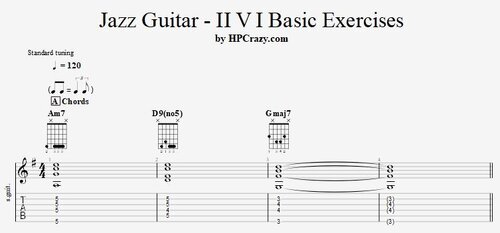 Love this one….as I find it difficult to improv over chord progressions in a meaningful way, the backing track and exercises provided in this tutorial I have found are very helpful……and fun to do…..Well written and I completely agree with your approach as I am also becoming more and more disinterested in what social media has to offer. I always look forward to your emails and the challenges you present….keep up your excellent work! king regards Greg


Important Information
Please read our Guidelines !
Account
Navigation
Search
Configure browser push notifications
Chrome (Android)
- Tap the lock icon next to the address bar.
- Tap Permissions → Notifications.
- Adjust your preference.
Chrome (Desktop)
- Click the padlock icon in the address bar.
- Select Site settings.
- Find Notifications and adjust your preference.
Safari (iOS 16.4+)
- Ensure the site is installed via Add to Home Screen.
- Open Settings App → Notifications.
- Find your app name and adjust your preference.
Safari (macOS)
- Go to Safari → Preferences.
- Click the Websites tab.
- Select Notifications in the sidebar.
- Find this website and adjust your preference.
Edge (Android)
- Tap the lock icon next to the address bar.
- Tap Permissions.
- Find Notifications and adjust your preference.
Edge (Desktop)
- Click the padlock icon in the address bar.
- Click Permissions for this site.
- Find Notifications and adjust your preference.
Firefox (Android)
- Go to Settings → Site permissions.
- Tap Notifications.
- Find this site in the list and adjust your preference.
Firefox (Desktop)
- Open Firefox Settings.
- Search for Notifications.
- Find this site in the list and adjust your preference.