Skip to content
View in the app

A better way to browse. Learn more.

Hanspeter Kruesi .com

A full-screen app on your home screen with push notifications, badges and more.

To install this app on iOS and iPadOS
  1. Tap the Share icon in Safari
  2. Scroll the menu and tap Add to Home Screen.
  3. Tap Add in the top-right corner.
To install this app on Android
  1. Tap the 3-dot menu (⋮) in the top-right corner of the browser.
  2. Tap Add to Home screen or Install app.
  3. Confirm by tapping Install.
Search Tags !

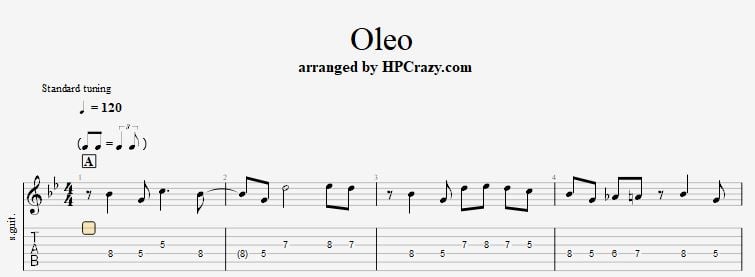
Oleo - Theme & Chords / Backing Track Drum & Bass 1.0.0

(1 review)

2 Screenshots

Oleo - Theme & Chords / Backing Track Drum & Bass 120 BPM

Here you find the tabs and the chords to the jazz standard " Oleo ". Oleo is rhythm change. The chords can be variated in several ways. I have choosen those which were written in the realbook. The backing track is only drum and bass so you can also take alternative chords. The tempo is only 120 bpm so that you can practice this tune in peace. Professional normaly play this tune with 240 bpm but it also sounds nice with 120 bpm.

These files are associated to this tutorial here :

 

User Feedback

You may only provide a review once you have downloaded the file.

   1 of 1 member found this review helpful 1 / 1 member

I didn't know this song at first and went to You Tube to hear it being played.  Sounds good, very jazzy and can't wait to get into it.  Is there your YouTube that goes with it?  Want to see how you play it would help along with your backing track.

Response from the author:

Hey Rossi, this is a classic jazz standard, which is mostly played quit fast. My version of it is on the way & the tutorial. I try to make a video with my version of it as well but I can not promise it since I am half step in my summer break :)

Account

Navigation

Search

Search

Configure browser push notifications

Chrome (Android)
  1. Tap the lock icon next to the address bar.
  2. Tap Permissions → Notifications.
  3. Adjust your preference.
Chrome (Desktop)
  1. Click the padlock icon in the address bar.
  2. Select Site settings.
  3. Find Notifications and adjust your preference.