Skip to content
View in the app

A better way to browse. Learn more.

Hanspeter Kruesi .com

A full-screen app on your home screen with push notifications, badges and more.

To install this app on iOS and iPadOS
  1. Tap the Share icon in Safari
  2. Scroll the menu and tap Add to Home Screen.
  3. Tap Add in the top-right corner.
To install this app on Android
  1. Tap the 3-dot menu (⋮) in the top-right corner of the browser.
  2. Tap Add to Home screen or Install app.
  3. Confirm by tapping Install.
Search Tags !

Rafi

Members
  • Joined

  • Last visited

  1.    Randy reacted to a post in a topic: So What
  2.    Randy reacted to a post in a topic: Guitar Secrets - Crazy Arpeggio Licks
  3.    Randy reacted to a post in a topic: Guitar Secrets - Crazy Arpeggio Licks
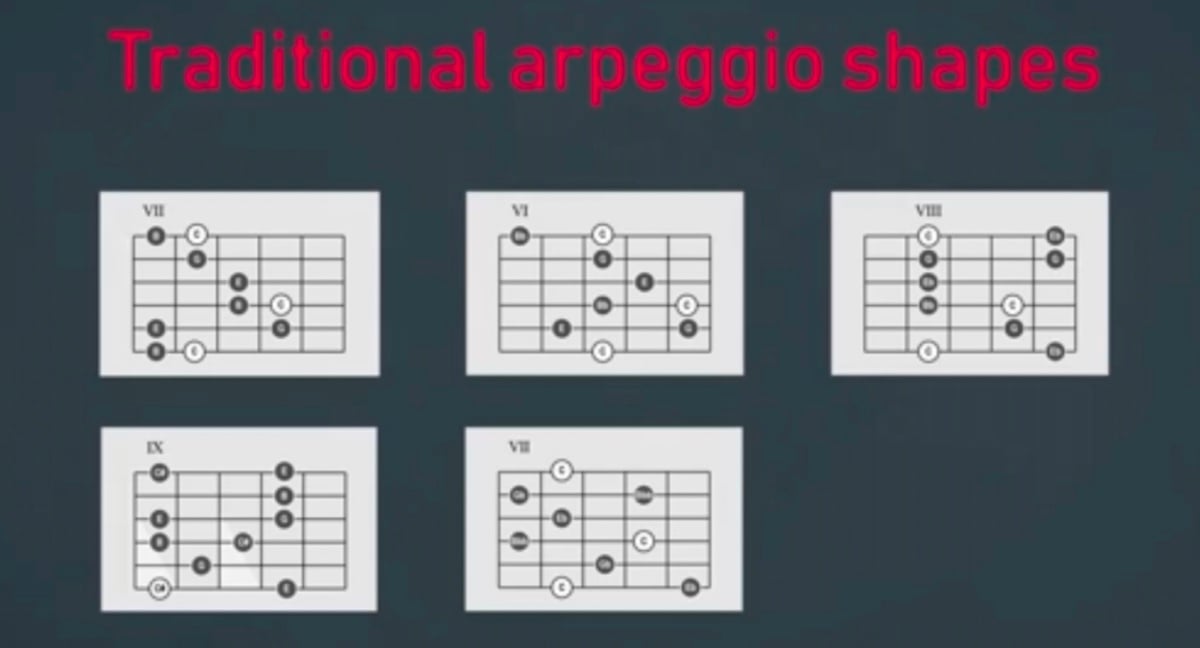
  4. Woow,.... it’s so streached... what do you think about duch approach:
  5. Hello, is there any lesson about arpeggios in basic form? I need to start and practice from simple form.
  6. Fantastic lesson! I like e.g. „upper structure” concept I have a question - there is the last part of the solo in Introduction part of the video - starting from 2:41. Can anyone advice me please if it is just D dorian scale played, or some alteration is present there? There is no tab for solo part in download section to check this.

Account

Navigation

Search

Search

Configure browser push notifications

Chrome (Android)
  1. Tap the lock icon next to the address bar.
  2. Tap Permissions → Notifications.
  3. Adjust your preference.
Chrome (Desktop)
  1. Click the padlock icon in the address bar.
  2. Select Site settings.
  3. Find Notifications and adjust your preference.