
Leaderboard


Popular Content
Showing content with the highest reputation on 01/21/2024 in all areas
-
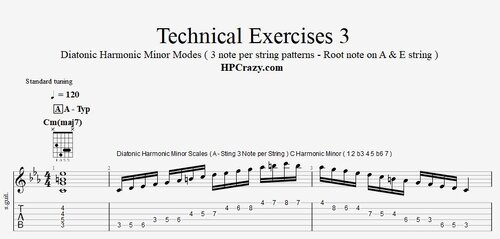 Here you find the diatonic chord progressions of harmonic minor in the key of Cm and Gm. These 2 keys represent all patterns which start either on the E or A string. Even harmonic minor is mostly used in way of having the focus on the minor pattern of the key it really also makes sense to learn those patterns related to the diatonic chord progressions. To understand harmonic minor it's really important to understand it's historical importance. The origin of all chord progressions is the classical cadence : In any major key you have the classic cadence leading from tonica ( I ) to subdominant ( IV ) to dominant ( V ). The dominant is either a major or a major 7 chord which creates a strong tension which leads back to the tonica ( I ). In minor keys I IV V are all minor chords which can work as a nice progression but to get a stronger resolution to the I somebody came up with the idea to have a " classic " dominant on the V in a minor progression. Now the minor key does not cover this alteration of the progression and when a V7 ( dominant ) chord is played in a minor progression the scale which normally would be phrygian on the V has to be altered by one note. This leads us to harmonic minor with the typical 1 1/2 tone step. Harmonic Minor is mostly played on the V7 chord but can also be used in other ways or even in a diatonic chord progressions setting. But the traditional way is to use Harmonic Minor when I V7 chord. Here you find the tutorial associated to this file :Free1 point
 -
1 pointHere I teach all you need to know about harmonic minor. The beginning of the tutorial is for everybody who wants to play harmonic minor and the 2nd part is only for those who understand the concept of modes and diatonic chord progressions. Here you can download the file associated to this tutorial :1 point
-
View File Diatonic Chord Progressions and Patterns - Harmonic Minor Here you find the diatonic chord progressions of harmonic minor in the key of Cm and Gm. These 2 keys represent all patterns which start either on the E or A string. Even harmonic minor is mostly used in way of having the focus on the minor pattern of the key it really also makes sense to learn those patterns related to the diatonic chord progressions. To understand harmonic minor it's really important to understand it's historical importance. The origin of all chord progressions is the classical cadence : In any major key you have the classic cadence leading from tonica ( I ) to subdominant ( IV ) to dominant ( V ). The dominant is either a major or a major 7 chord which creates a strong tension which leads back to the tonica ( I ). In minor keys I IV V are all minor chords which can work as a nice progression but to get a stronger resolution to the I somebody came up with the idea to have a " classic " dominant on the V in a minor progression. Now the minor key does not cover this alteration of the progression and when a V7 ( dominant ) chord is played in a minor progression the scale which normally would be phrygian on the V has to be altered by one note. This leads us to harmonic minor with the typical 1 1/2 tone step. Harmonic Minor is mostly played on the V7 chord but can also be used in other ways or even in a diatonic chord progressions setting. But the traditional way is to use Harmonic Minor when I V7 chord. Submitter admin Submitted 01/21/2024 Category Theory & Exercises1 point
-
What A Wonderful World - Guitar Lesson This is an arrangement which I wrote for the song " What a wonderful world " by Louis Armstrong ". This version is set on a voice-leading with only 3 voices which is a bit unusual for jazz guitar arrangements. I wanted to do it this way for 2 reasons. 1. I love this open spaced sound and with the guitar chord voicings I have chosen you can also add a bluesy vibe to by adding vibrato's on the chords. 2. It's a really simple to play version so that intermediate guitar players also have a chance to master this classic tune which everybody should have played once. Here you can download the tabs related to this tutorial here : If you need any further professional support please book a private online guitar lesson here : https://www.hanspeterkruesi.com/members/store/category/1-private-online-guitar-lessons/1 point
-
1 point
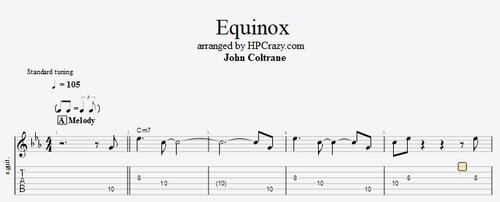 Equinox ( John Coltrane ) - Tabs & Backing Track Here you find the tabs of the melody and the chords of the standard " Equinox " by John Coltrane. The backing track is pretty much adapted to the original recording with the John Coltrane band. These files are associated to this tutorial here :Free1 point
 -
 Oleo - Theme & Chords / Backing Track Drum & Bass 120 BPM Here you find the tabs and the chords to the jazz standard " Oleo ". Oleo is rhythm change. The chords can be variated in several ways. I have choosen those which were written in the realbook. The backing track is only drum and bass so you can also take alternative chords. The tempo is only 120 bpm so that you can practice this tune in peace. Professional normaly play this tune with 240 bpm but it also sounds nice with 120 bpm. These files are associated to this tutorial here :Free1 point
 -
 These files are associated to this tutorialFree1 point