
Leaderboard


Popular Content
Showing content with the highest reputation on 11/07/2021 in all areas
-
Minor & Major Pentatonic Patterns
EdgardoUcha reacted to admin for a file
1 point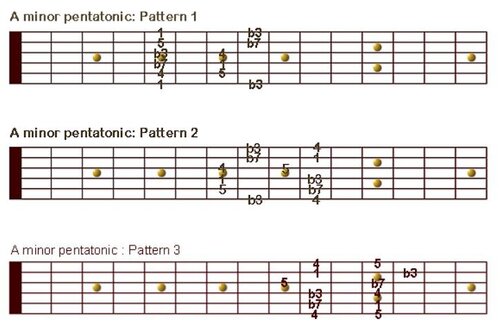 Here you find all patterns in minor and major pentatonics. The positions are marked with numbers which represent the intervals which are played. As a beginner only focus on learning the position of the 1 which represents the root note. In this case it's the A since the patterns are either in A minor or A major. It is also strongly recommended to learn the pentatonic only on one string. There please also use the 1 as an orientation point. When you compare the minor with the major pentatonic patterns you might notice that they are the same only the root note has changed. The good news is that once you can play the minor pentatonic patterns you can switch to the major pentatonic patterns just by replacing the root note.Free1 point