Skip to content
View in the app

A better way to browse. Learn more.

Hanspeter Kruesi .com

A full-screen app on your home screen with push notifications, badges and more.

To install this app on iOS and iPadOS
  1. Tap the Share icon in Safari
  2. Scroll the menu and tap Add to Home Screen.
  3. Tap Add in the top-right corner.
To install this app on Android
  1. Tap the 3-dot menu (⋮) in the top-right corner of the browser.
  2. Tap Add to Home screen or Install app.
  3. Confirm by tapping Install.
Search Tags !

Chuck Berry Style Guitarsolos : Tabs & Backing Track 1.0.0

(0 reviews)

2 Screenshots

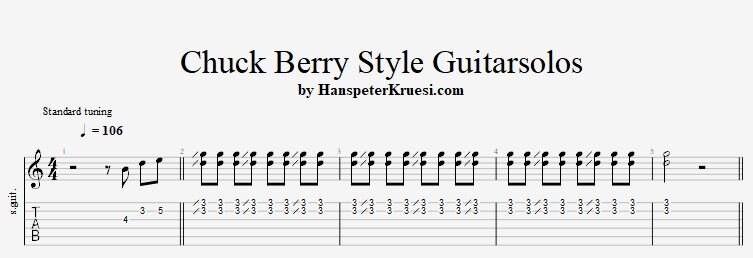
Here you find the tabs of 4 repeating licks in the chuck berry style. The trick is that you have a figure of 3 in 8th notes which makes the accent move till the circle is completed after 3 bars. The backing track is a typical rock n roll tune in the key of G with 106 bpm.

These files are associated to this tutorial :

User Feedback

Recommended Comments

jmpilo

Premium

  • Premium

Excellent lesson! Been playing for years. But its fantastic learning how to play these riffs correctly! Easy & simple to follow, but very powerful!

  • Admin

Hey Joe, glad that those lessons really help you and yeah they are powerful and easy to play. riffer

Account

Navigation

Search

Search

Configure browser push notifications

Chrome (Android)
  1. Tap the lock icon next to the address bar.
  2. Tap Permissions → Notifications.
  3. Adjust your preference.
Chrome (Desktop)
  1. Click the padlock icon in the address bar.
  2. Select Site settings.
  3. Find Notifications and adjust your preference.