
Leaderboard
-

-

EdgardoUcha
PremiumPoints20Posts -


Popular Content
Showing content with the highest reputation since 09/16/2026 in all areas
-
Slow Classic Rock Guitar Riff
admin reacted to EdgardoUcha for a post in a topic
1 pointGreat HP!! Sharing. Abrazo Amigo.1 point -
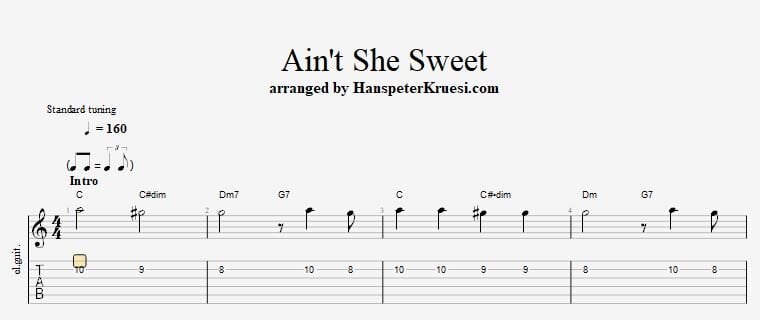
Here I show you how to play the tune " Ain't She Sweet " on jazz guitar. I am referring to the version of 1927 by Gene Austin. The theme is played in this C major scale pattern : E |----------------------------|-----------------7--8-------|| B |----------------------------|-----------8--10------------|| G |----------------------------|--7--9--10------------------|| D |-----------------7--9--10---|----------------------------|| A |--------7--8--10------------|----------------------------|| E |--8--10---------------------|----------------------------|| The chords I am showing you are either following the melody or are below the melody to not interfer with it. Here you can download the files associated to this tutorial :
 1 point
 -
Hi Hanspeter, It's great how you use these chords to give the song some energy and make it sound well-rounded. (I still need to get my fingers to cooperate, though) 🎸👍1 point
-
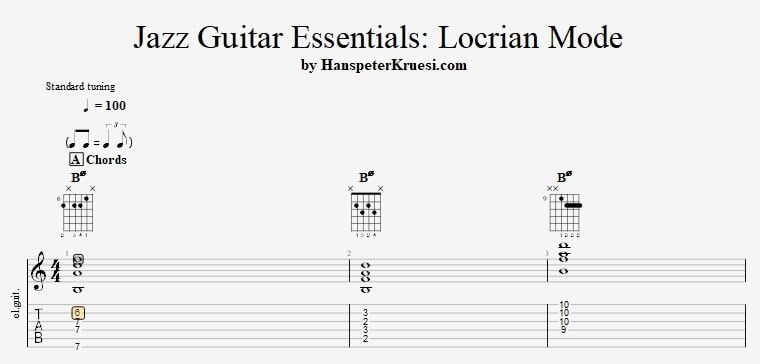
This is the last tutorial of the jazz guitar essentials - modes series and I will be talking about the locrian mode. Even the locrian mode is only very rarely use in a modal improvisation setting it is still crucial to know the last of the 7 essential modes. You often use that mode with arpeggios in a IIm7b5 V7 Im7 setting or i a way that you prepare the improvisation for the next chord. In a modal improvisation it is hardly used but you can use the locrian mode as a preparation for the altered mode which is called " super locrian ". The difference between locrian and super locrian is that you change the 4 to a 3. Here you can download the files which are associated to this tutorial :
 1 point