
Leaderboard



Popular Content
Showing content with the highest reputation on 03/18/2026 in Posts
-
Basic Slow Blues Guitar Training - Chords & Solo
PurpleGecko reacted to admin for a post in a topic
1 pointHere you learn to make basic combinations with chords and solo's from scratch. The key to make the combinations is that you always know where in the bar and the form of the blues you are. This is a basic slow blues guitar form with : Am7 / Dm7 / Am7 / Am7 / Fmaj7 / E7 / Am7 Dm7 / Fmaj7 E7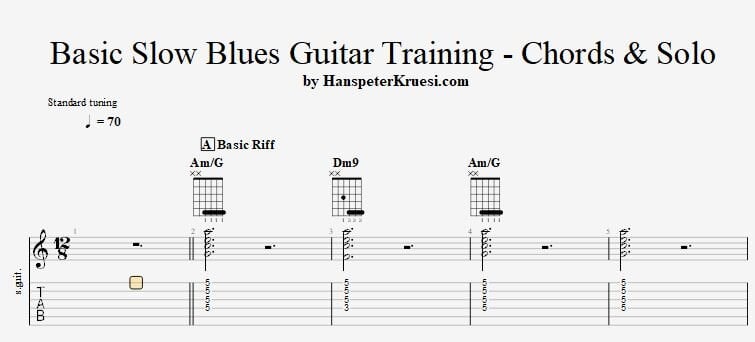 1 point
 -
Thank you very much, Hanspeter, for this lesson. Practicing this is great fun. Best regards, Fredy1 point
-
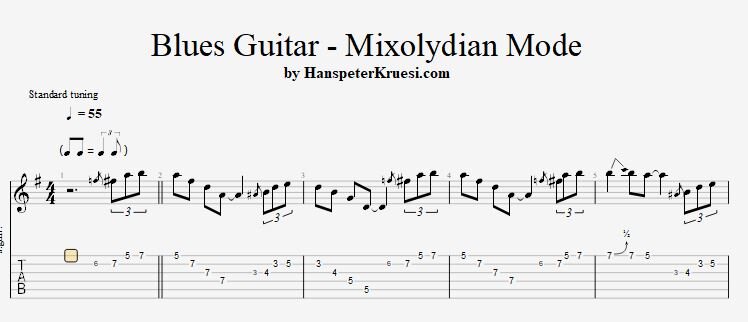
1 pointThe most common question in many years of teaching guitar is how to use the mixolydian mode in blues guitar. Here I show you a good method to start using the mixolydian mode the easy way just by following the regular chords of this standard blues in D with the following chord progression : D / G / D / D G / G / D / D A / G / D / A Here you can download the files associated to this tutorial :
 1 point