
Leaderboard


Popular Content
Showing content with the highest reputation on 09/16/2025 in all areas
-
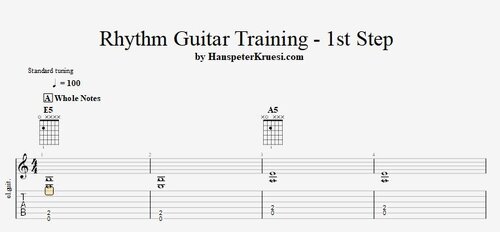 Here you find the first exercises where you learn the notation of whole, half and quarter notes + how to use ties to make combinations out of these 3 basic rhythm notation figures. It is very important that you also learn the related pauses. The backing track is a very simple progression with E / E / A / A and there you can start to work out a basic rhythm guitar as written in the exercises. I strongly recommend that you start working with the attached guitar pro file in oder to control if you are doing every thing perfect with those exercises. Here you can get a guitar pro software at a reduced price : https://www.hpcrazy.com/free-guitar-pro-tabs.html Here you find the tutorial associated to these files :Free1 point
 -
Rhythm Guitar Training - 1st StepHere you find the first exercises where you learn the notation of whole, half and quarter notes + how to use ties to make combinations out of these 3 basic rhythm notation figures. It is very important that you also learn the related pauses. The backing track is a very simple progression with E / E / A / A and there you can start to work out a basic rhythm guitar as written in the exercises. I strongly recommend that you start working with the attached guitar pro file in oder to control if you are doing every thing perfect with those exercises. Here you can get a guitar pro software at a reduced price : https://www.hpcrazy.com/free-guitar-pro-tabs.html Here you find the files associated to this tutorial :
1 point