
Leaderboard


Popular Content
Showing content with the highest reputation on 11/29/2024 in Files
-
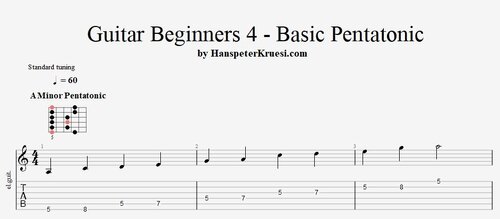 Here you find the tabs for the basic pentatonic patterns in A Minor and A Major. You can notice that the patterns are exactly the same and only the position of it and the position of the root note ( red note ) is different. You can play both pentatonics to the backing track added. If you play the minor pentatonic to the track it will sound like blues and if you play the major pentatonic it will sound like a pop song. I have written 2 examples for you that you can see how you work with those pentatonics. The main beginner rule is : " Start on the root note ( the red note ) " The backing track is the same as from " Guitar Beginners 2 " - you can pratice with that one. These files are associated to this tutorial :Free1 point