
Leaderboard


Popular Content
Showing content with the highest reputation on 05/12/2024 in Files
-
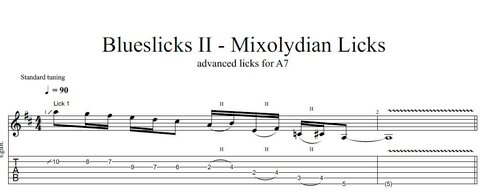 Mixolydian Blues Guitar Licks - Tabs and Audio File Here you find a selection of advanced blues guitar licks which work on any A7 chord with a straight groove. If you have a blues with a shuffle groove it also might work but you need to adapt the timing signatures on some licks. Check them out slowly and analyze what has been done and how the licks are played. This way you get the maximum benefit from practicing this big selection of mixolydian licks. Here you can learn more about how to use the mixolyidian mode in blues guitar :Free1 point
 -
1 point
 Mixolydian Blues Guitar Licks A7 - Tabs & Backing Track Here you find a selection of mixolydian blues guitar licks which you can use on A7. The attached backing track is on A7 only that you can practice the licks here. These files are attached to this tutorial here : and here you find more mixolydian licks in A7 which you can use in blues :Free1 point