
Leaderboard



Popular Content
Showing content with the highest reputation on 02/12/2024 in all areas
-
Here I show you some ideas on how to play a classical cinematic rock guitar riff. The first version uses the arpeggio's of the chords played with sweep and palm muting technique which in fact is a bit demanding. The 2nd version uses easy power chords with a modern cinematic touch. Here you can download the files associated to this tutorial :1 point
-
This is a cool and laid back version of Stevie Wonders " Isn't She Lovely " played on the nylon guitar. I recorded this version direct after the video shooting of the tutorial and beside many possibilities of the vibe of the improvisation I decided to go for the extremly laid back and cool type of improvisation. In my view less notes often sound like more music then too many notes. The nylon guitar has such a nice sound when you want to rest just in one note and enjoy that one note. That's why I picked the nylon guitar. If you love this version - here's a tutorial :1 point
-
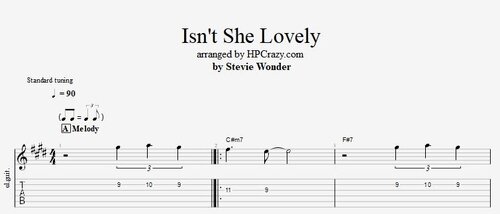 Here you find the tabs of the theme of Stevie Wonders tune " Isn't She Lovely " + the chords for a simple arrangment with only one guitar + drums played with brushes or only one guitar. You also find the scales which can be used on the improvisation but check the tutorial for my tips and tricks for the improvisation. These files are associated to this tutorial :Free1 point
 -
I have made my own recording of this tune direct after the shooting of this tutorial. You can check it out here : If you feel like you want to share your version of this tune you are free to post it as well.1 point
-
1 pointI keep a large picture of him behind my desk and another hanging at my restaurant next to the stage... he's a good reminder to make every note mean something.1 point
-
1 pointLa Vie En Rose ( Edith Piaf ) - Guitar Lesson Here you can learn the chords and the melody of one of the sweetest melodies from the 20th century. La vie en rose by Edith Piaf. The melody seems simple but it's a big a brainer to get the fingering done nicely. But I worked out a nice version for you. La Vie En Rose ( Edith Piaf ).pdf La Vie En Rose ( Edith Piaf ).gp la vie en rose.mp31 point
-
1 pointHere I show you a cool shuffle blues guitar riff which you can use in your blues band with only drum and bass to get a great and fat band sound with only one guitar. But of course it works also with more instruments in the band. I show you the riff and then give you some ideas to develop it during the tune. Here you can download the files associated to this tutorial here : If you need any further assistance please book a private online guitar lesson here : https://www.hanspeterkruesi.com/members/store/category/1-private-online-guitar-lessons/1 point