
Leaderboard



Popular Content
Showing content with the highest reputation on 01/13/2024 in all areas
-
If you want to follow chords in blues with adaptiv double stops then voicing leading is the right technique to fulfill the task. Here you show you some examples of how you can follow the chords in a simple blues guitar progression with Bb7 / Eb7. Here you can download the files associated to this tutorial :1 point
-
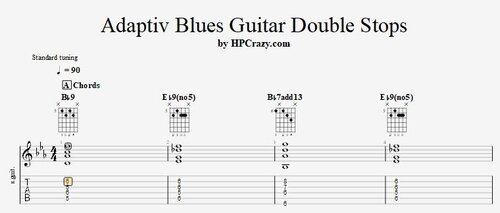 Here you find the tabs of some adaptiv blues guitar double stops. They follow the chords of the progression of the backing track which is : Bb7 / Eb7 / Bb7 / Eb7 This technique is called " voice leading ". The cool thing is that mostly you only have to change one note to follow the chord which makes it sound great. There are also chord examples which work with a very nice voice leading technique following the chords. These files are associated to this tutorial :Free1 point
 -
Yeah this one is really important to play over the entire fretboard1 point
-
Cool blues.......thanks HP!1 point
-
Great stuff.....cheers HP!1 point