
Leaderboard



Popular Content
Showing content with the highest reputation on 11/29/2023 in all areas
-
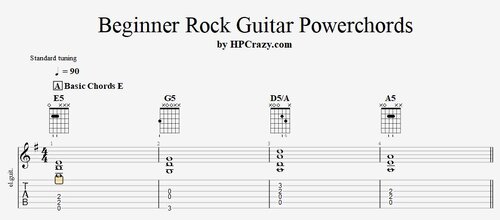 If you are a beginner on guitar and you love to play rock and you still can not play the basics chords : then these tabs are for you. Here you can start with the most easy ways of playing rock guitar power chords and you can already start to play your first rock guitar riffs even if you still are struggling with guitar chords. There are 3 keys + available. The keys of Em and Am work well because you can work with easy open string power chords and any other key works with the power chord inversions which are very easy to grab. The focus here is on your learning process of the basic rhythm figures with full, half, quarter and 8th notes. In rock guitar the rhythm is very important so get to know those basic rhythm figures, also the pauses and start to practice them with the beginners power chords to be ready for the basic power chords with more complex rhythms : These files are associated to this tutorial here :Free1 point
 -
1 pointSophisticated Blues Guitar Here you can learn some sophisticated ways of playing blues. There is a more sophisticated blues form with different chords and I will show you how to use the minor and the major blues scale to handle those chord changes. sophisticated blues.pdf sophisticated blues.gp sophisticated blues guitar.mp31 point
-
1 pointGreat advice........cheers HP1 point