Leaderboard


Popular Content
Showing content with the highest reputation on 10/06/2023 in all areas
-
1 point
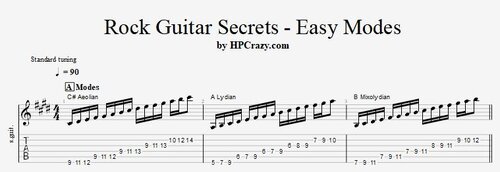 Here you find some exercises to work with modes in a simple rock guitar tune with the progression : C#m / C#m / A / A / B / B / C#m / C#m I am using the basic patterns of the modes technical exercises. I strongly recomment that you work on all of them when you want to get deeper into modes in any genre : These files are associated to this tutorial here :Free1 point
 -
1 pointIf you want to go to the next step in your rock lead guitar you can not pass the modes. Here I give you some first insight how you can work with modes in rock guitar by using a very simple chord progression : Here you find the files associated to this tutorial : I am using the basic patterns of the modes technical exercises. I strongly recomment that you work on all of them when you want to get deeper into modes in any genre :1 point
-
There is now a new payment gateway where you can pay with creditcard. It is powered by stripe.com. I don't know how it works at the moment. So if any of you want to be the first tester please let me know. If something goes wrong I will give you a refund.
 1 point