
Leaderboard


Popular Content
Showing content with the highest reputation on 10/03/2023 in all areas
-
2 pointsSUISA foreign royalties settlement. My music was used a lot on TikTok without my knowledge. How this got there I do not know, but is nice. Otherwise there are over 60 pages with uses on Amazon and Deezer. The winner are my 2 brands " color music " and " color music ". It is indeed planned to compose new music and distribute accordingly digitally through my digital record company. Gives a lot to do....2 points
-
HPCrazy Guitar Night - 21. Oct. 2023
woodoo and one other reacted to admin for a comment on an event
2 points2 points -
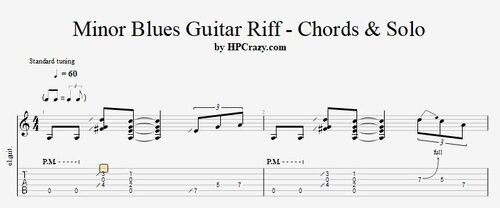 Here you find some really cool examples of a minor blues riff in the key of Am in combination with some fill-ins. There are 2 backing tracks added. One is only drums and bass and the 2nd one has an organ added if you don't feel confortable with the puristic trio formation. These files are associated to this tutorial :Free1 point
until