
Leaderboard


Popular Content
Showing content with the highest reputation on 08/29/2023 in all areas
-
1 pointHere I am going through all basic exercises which you need to master if you want to have a good rock guitar timing with a precision level of 100%. Before you can not play the basic timing signatures of whole, half, quarter, 8th and 16th notes you can not get deeper into complicated rhythms and expect to be precise. This tutorial and bootcamp is for all players who have never done the rock guitar timing bootcamp before. This tutorial is a " MUST HAVE " for all players who want to get a perfect timing. Here you can download the files associated to this tutorial :1 point
-
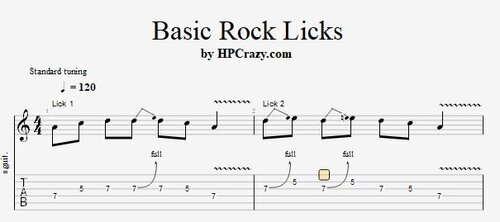 Here you find 7 rock guitar licks in the key of Am which represent the basic rock guitar licks which I strongly recommend to learn. You can use them in any rock guitar setting. I have added 2 different backing tracks in the same key that you can practice them with a different vibe. These files are associated to this tutorial :Free1 point
 -
1 pointIn this tutorial I show you 7 easy rock guitar licks which from my personal view are the most important rock guitar licks which you need to know to get comfortable in any rock lead guitar situation. They are shown in the key of Am in the 1st position of the minor pentatonics. This tutorial is a must have for any rock guitar player. Here you can download the files associated to this tutorial here :1 point
-
At the moment I'm working a lot on "jazz guitar" - my goal is to combine a fusion of traditional jazz guitar in the style of Kenny Burell, for example, with the funky style of George Benson but with a bluesy / rocking expressive tone of Scott Henderson, for example. Is a lot of work for the fact that jazz is not necessarily a popular genre. Anyway, the goal is to present such a program to my community at my Guitar Night on Sept 22 ( online ). Plus influences and sections with Stanley Jordan and Joe Pass style. More to come soon...1 point
-
1 pointThis tutorial will come soon - for all Fans of Jazz Guitar and Kenny Burell.1 point
-
Guitar Practice Notes, Files and Thoughts
PurpleGecko reacted to admin for a post in a topic
1 pointI am currently working a lot on open string chord progressions where I keep one open or more open strings as a pedal point in a compositon or a chord progression inside a composition. This one note which always rings through the progression is giving the whole sound a pedal like sound such as you might know from the piano and also gives it a mystical and lyric vibe. Here is a small example of a chord progression I am working on. It's in Am and goes through the chords Am9 / Fmaj7#11 / Dm6/11 / Cadd9 G6/B E |--------------0-----------------------0-------------| B |-----------0-----0-----------------0-----0----------| G |--------12----------12----------12----------12------| D |-----10----------------10----10----------------10---| A |--12----------------------12------------------------| E |----------------------------------------------------| --------------0-----------------------0-------------| -----------0-----0-----------------0-----0----------| --------9-----------9-----------9-----------9-------| -----7-----------------7-----7-----------------7----| --8-----------------------8-------------------------| ----------------------------------------------------| --------------0-----------------------0-------------| -----------0-----0-----------------0-----0----------| --------5-----------5-----------5-----------5-------| -----3-----------------3-----3-----------------3----| --5-----------------------5-------------------------| ----------------------------------------------------| --------------0-----------------------0-------------|| -----------3-----3-----------------3-----3----------|| --------0-----------0-----------0-----------0-------|| -----2-----------------2-----0-----------------0----|| --3-----------------------2-------------------------|| ----------------------------------------------------||1 point -
Guitar Practice Notes, Files and Thoughts
PurpleGecko reacted to admin for a post in a topic
1 pointOn my last fullmoon concert which I started only on piano at the beginning of the year I announced that on the next concert on Oct. 9th I will bring back the solo guitar into the game. That means for me that I am starting to practice my finger style guitar songs on Farbmusik again and of course also my Touch Technique which more or less is in fact piano playing on the guitar. I must say this technique is really hard when you start to learn it. It's not only that you are doing 2 hand tapping. It's also the fact that you only have 6 strings on the regular guitar and the space is really limited. But I really love love love this technique on the 6 string guitar because it expands the creative expression on the regular guitar so much. But still I have bought a 7 string guitar now because I sometimes really would love to have one additional string. Here you can download the tabs of a song played with touch technique free for all members : And here you can listen to how it will sound at the end on a concert :1 point