
Leaderboard


Popular Content
Showing content with the highest reputation on 03/21/2023 in all areas
-
1 pointBlues Guitar Deluxe Here I give instructions on how to master a shuffle blues in the tempo of 80 bpm. This seems to be slow but if you want to make this kind of blues really great and punchy you need to know a few tricks and tips which I am showing you here. If you have any questions please ask it in this post below or book a private online guitar lesson.1 point
-
1 point
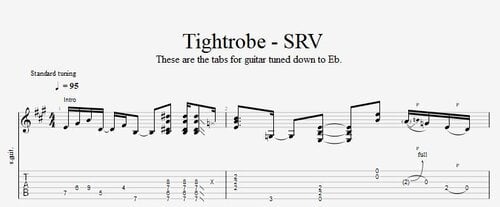 Here you find the tabs of the song " Tiderope " by Stevie Ray Vaughn. There are several versions available - I have taken the one from the studio album " In Step ". This can be different from live recordings which is quite normal for any blues artist. To get the original SRV sound you need to tune your guitar down to Eb. Here you find the tutorial related to these tabs :Free1 point
 -
1 pointHere I show you the main guitar parts of the tune " Tightrope " by Stevie Ray Vaughan. I took the studio version on the CD " In Step " as reference. Here you can download the tabs associated to this tutorial : If you need any further professional assistance please book a private online guitar lesson here : https://www.hanspeterkruesi.com/members/store/category/1-private-online-guitar-lessons/1 point